From Column Inches to the News Feed: Why Story Order Changed
Column inches to the news feed: learn why story order changes across print and digital news, and how to tell what a story’s placement does—and doesn’t—mean.
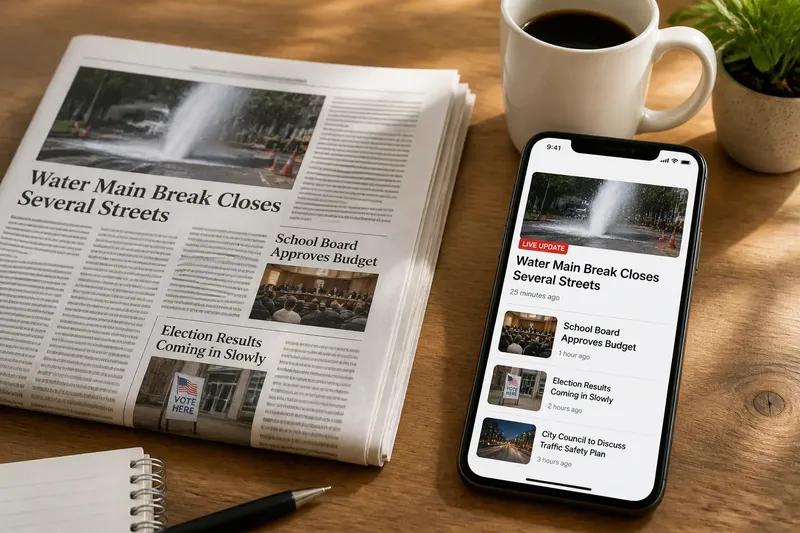
Why did this story appear before the others when you opened the news? The shift from column inches to the news feed changed how editors arrange stories and how readers encounter them. A printed page holds a shared order; a digital feed can change, and readers may enter through different routes.
Consider an invented situation. A local newsroom is covering a water-main break, a school-board vote and a regional election. In print, editors must fit those stories on a finite page, choose their positions and send the edition to press. On the newsroom’s site, stories can move, expand or be replaced as information arrives. The reporting may overlap, but each reader’s sequence can differ.
The Printed Page
A printed newspaper gives editors a bounded surface. Page size, column width, photographs, advertisements and deadlines all constrain placement. The front page signals priority through position and prominence; inside pages give other subjects room to develop.
That arrangement is not neutral. Choosing a lead involves judgments about public importance, urgency and available space. A large headline near the top is more likely to meet readers than a brief item deep inside the paper. Everyone holding the same edition sees the same visible order.
Print also has a practical limit: once the paper is printed, its pages cannot respond to a new announcement. A late update may appear in a later edition or the next day’s issue. Readers receive a package assembled at a particular moment, even as the story continues to change.
The Changing Feed
A digital feed has no single front page in quite the same sense. A news organization can update a story, add an item or change the order of cards without waiting for a new print run. Readers may arrive through a homepage, topic page, search result, app alert or shared link. Each route creates a different first encounter.
Some feeds are arranged by editors; others use software to sort items according to signals such as recency, topic or a reader’s settings. These systems do different things. A chronological list emphasizes time, while an editor-curated homepage reflects editorial choices about importance. A personalized feed may place a familiar subject near the top without claiming it matters most to everyone.
Placement remains a cue, not a full account of editorial intent. A breaking alert at the top may feel more urgent than an explainer farther down. A visible story can seem central, while one that slips out of view can seem finished, even if it is not.
A Newsroom’s Choices
In the invented newsroom, the water-main report leads the site because the closure affects several neighborhoods and drivers need immediate information. The school-board vote has a scheduled result, while election coverage is waiting on counts. An editor places the service update first, links to the vote story below it and keeps an election page available for later updates.
As the day unfolds, the utility clarifies which streets are affected. The newsroom revises the report and adds a timestamp. The board vote becomes final, so its story moves upward. Election results arrive in stages; the newsroom adds an update without presenting an incomplete count as settled. The feed changes as information and readers’ practical needs change, rather than simply reproducing a printed page.
Now imagine a reader who enters through a shared link to the school-board story. That reader may never see the water report that led the homepage earlier. Another reader opening the app later may encounter the election update first. Each has entered at a different point in a changing stream.
Questions About Story Order
Does the top story matter most?
Not necessarily. It may be first because it is urgent, newly updated, selected by an editor or surfaced by a feed’s sorting rules. Check the page’s labels and compare the placement with the story’s actual public impact.
Why did the order change?
An editor may move an item after a development, or a feed may refresh according to its sorting rules. Look for a timestamp, editor’s note or “latest” label before interpreting a move as a change in importance.
Do all readers see the same order?
Not always. A homepage, app notification, search page and shared link can each lead to a different story first. The route into a report helps explain why readers may describe the day’s coverage differently.
How can I find an earlier version?
Look for an update history, timestamp or links to related coverage on the news organization’s page. If none is visible, treat the current wording as the latest presentation, not a record of every change.
Reading the Sequence
When a story catches your eye, separate its subject from its position. Ask whether the page is organized by latest updates, editor choice, topic or personalization. Then scan nearby items and related links: the first card may be useful without representing the full range of the day’s coverage.
For the invented reader following the water-main break, the service alert answers an immediate travel question, while the board vote and election reports concern different public decisions. Their order can change without making one subject a substitute for the others. Checking timestamps and neighboring stories helps reveal what a single entry point leaves out.
The move from column inches to the news feed did not remove editorial judgment; it made the point of entry less uniform and the order more adjustable. To understand why one story appeared first, check both who arranged the sequence and where you entered it. That distinction helps prevent temporary placement from being mistaken for a complete map of what matters.